
How to Optimize Google Business Profile for a Physiotherapy Clinic
Get a quick blog summary with:


An optimized Google Business Profile can help a physiotherapy clinic appear more prominently in Google Search and Maps, attract more local patients, and turn searches like “physiotherapy near me” into calls and bookings. The key is to:
- Claim and verify your profile with accurate, consistent business information.
- Choose the right primary category and add relevant services.
- Write a clear, patient-focused business description.
- Upload high-quality, authentic photos and videos regularly.
- Build a steady stream of genuine patient reviews and respond to every review professionally.
- Keep your Q&A section updated with useful answers to common patient questions.
- Publish helpful Google Posts consistently.
- Monitor GBP performance and use search and engagement data to improve your strategy.
- Follow Google’s guidelines to avoid keyword stuffing, fake reviews, inaccurate information, or suspension.
- Support your profile with local citations, relevant content, and other physiotherapy SEO efforts.
The biggest takeaway: Google Business Profile optimization is not a one-time setup. Consistent reviews, accurate information, fresh content, and ongoing activity can strengthen your local presence and help your clinic compete for valuable Google Maps visibility.
Someone just searched “physiotherapy near me.” Google displayed three local clinics. Yours missed the cut.
Sound familiar? It happens constantly. Most physio clinics let their Google Business Profile sit neglected: a blurry photo from three years ago, an outdated phone number, zero reviews ever answered. Patients scroll right past. They never even reach your website.
Google itself confirms that complete, well-maintained business profiles earn more trust, clicks, and calls. For a physiotherapy clinic, that gap often decides whether a worried patient dials you or the practice two blocks over.
This guide covers how to optimize a Google Business Profile for a physiotherapy clinic starting from a very basic level. You will learn practical physiotherapy local SEO tactics, proper Google Maps optimization steps, and a repeatable approach to physiotherapy clinic Google Maps ranking, turning a listing into the clinic’s hardest-working salesperson.
How Google Business Profile Helps a Physiotherapy Clinic
A Google Business Profile acts as a free digital storefront, making it one of the most powerful local marketing tools for a physiotherapy clinic. When patients experience sudden back pain, sports injuries, or post-op stiffness, they immediately search for terms like “physiotherapist near me.” Having an optimized Google Business Profile for a physiotherapy clinic ensures your practice appears exactly when and where they are looking to book an appointment.
Think about your own search habits. When your back locks up on a Tuesday morning, do you dig through page three of search results? No. You tap on one of the top three businesses sitting right inside the Google Maps box.
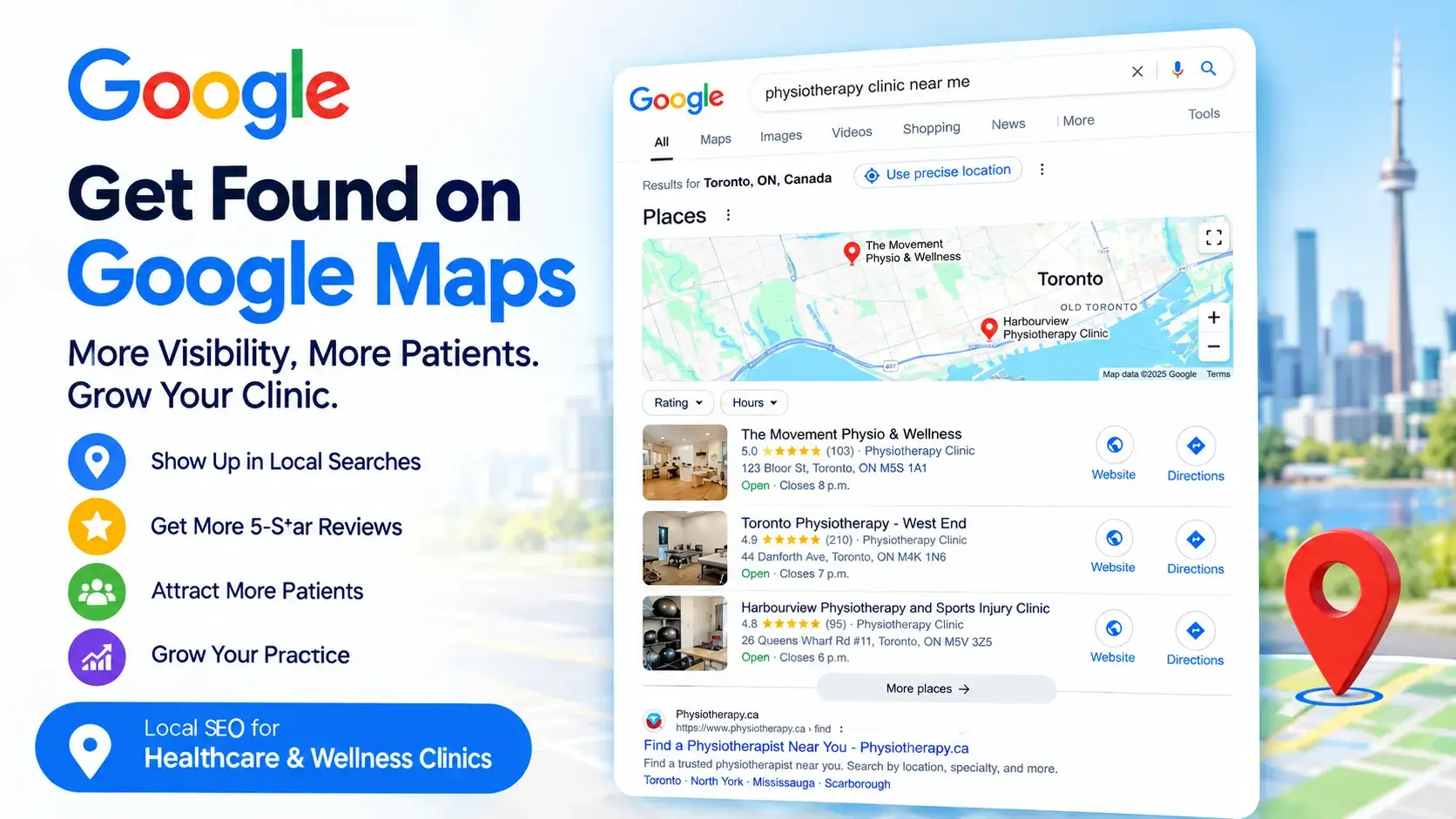
Patients do the same thing.
Your GBP anchors itself right on the search page. It flashes location, star rating, operating hours, and a direct call button before a user ever blinks. That instant visibility triggers what marketers call zero-click searches. A strained shoulder patient finds your number, taps it, and books an appointment on the spot without ever loading the homepage.
Without an optimized Google Business Profile for a physiotherapy clinic, you hand those patients straight to the practice down the street.
Get More Calls, Directions & Appointment Requests
How Google Chooses the Top 3 Results (The Ranking Formula)
Google ranks local listings based on relevance, distance, and prominence. The algorithm combines business data, website authority, and overall web presence to identify the top three practices for the local map.
Here is how those specific pillars work together to drive a business’s visibility:
- Relevance measures how closely a listing matches search terms. Category selection and accurate GBP setups drive this factor.
- Distance measures physical proximity to the user.
- Online reputation reflects a clinic’s popularity, credibility, and overall digital presence. Reviews, citations, and broader physiotherapy SEO efforts help strengthen this signal.
Optimizing for these three core signals turns a basic directory listing into a steady stream of new patients, steadily lifting your physiotherapy clinic Google Maps ranking.
Before You Start: What You’ll NeedGrab these essentials before you open the GBP Manager dashboard. Trust me, hunting for passwords halfway through ruins your flow.
Got everything ready? Good. Let’s dive in. |
How to Optimize Your Physiotherapy Google Business Profile (Step-by-Step)
A basic listing takes just five minutes to create. Transforming that listing into a reliable local asset takes a clear, practical approach. This section walks you through every important step. From choosing the right medical categories to building a steady review process, follow these tactics in your Google Business Profile optimization for physiotherapists to get more visibility than nearby clinics and help more patients find your clinic.
Step 1: Claiming and Verifying Your GBP
Before you can add photos or change hours, you need to prove to Google that your business actually exists.
Go to Google Business Profile and search for your clinic name. If it already appears, click <Claim this business>. If it doesn’t show up, click <Add your business to Google> and enter the official business name.
As you enter the primary business details, maintain strict NAP Consistency (Name, Address, and Phone Number). This consistency is also a core part of a broader physiotherapy SEO strategy, especially when improving a clinic’s local visibility across search results. Any mismatch in business details confuses Google’s search algorithm and can drag down your search rankings.
Next comes verification. Generally, Google mails a verification code directly to the clinic address. Alternative options like phone or email verification occasionally appear depending on the account.
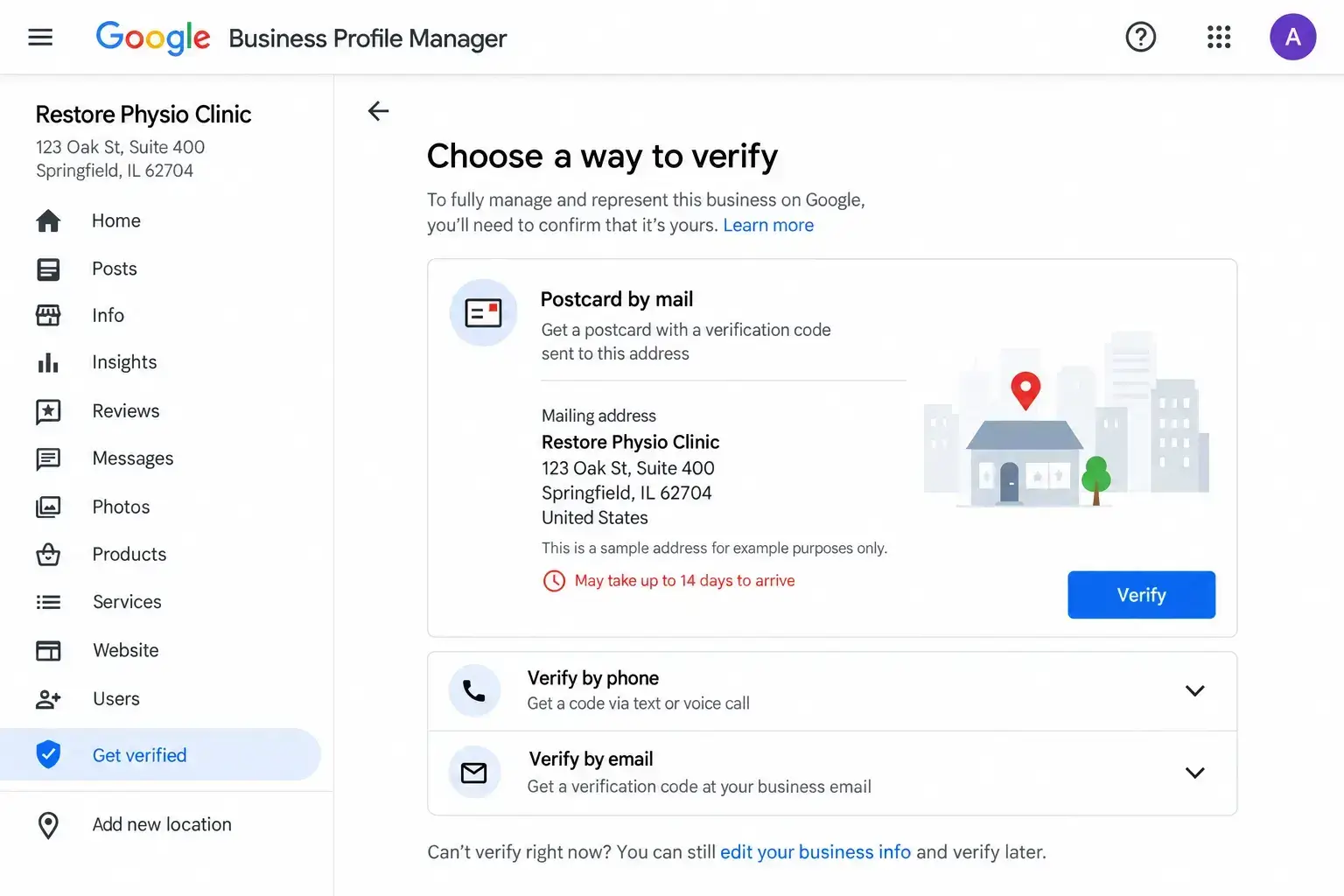
Do not skip or stall this step. Your profile stays hidden from potential patients on Google Maps until you plug that verification code into your dashboard. Once you enter it, your listing goes live and you unlock full control over your business info.
| Pro Tip*: Run your profile from a dedicated business email address, never a personal Gmail account. Staff members leave jobs, passwords vanish, and you do not want to gamble your entire local presence on a former employee’s inbox. |
Step 2: Choose the Right Categories and Services
Categories determine which searches the clinic shows up in at all. If you get this wrong, the clinic becomes invisible for the search queries that matter most.
Set the primary category as “Physiotherapist” or “Physical Therapy Clinic.” This is non-negotiable. From there, add secondary categories that genuinely fit your practice: Sports Medicine Clinic, Rehabilitation Center, Pain Management Physician, or whichever combination matches what you actually offer.
Now, services. Don’t just write “Physiotherapy” and walk away thinking the job’s done. Make the list of treatments in specific terms:
- Dry Needling
- Sports Injury Rehabilitation
- Pre- and Post Surgical Rehab
- Vestibular Therapy
- Manual Therapy
- Pediatric Physiotherapy
- Geriatric Physiotherapy
- Pelvic Floor Physiotherapy
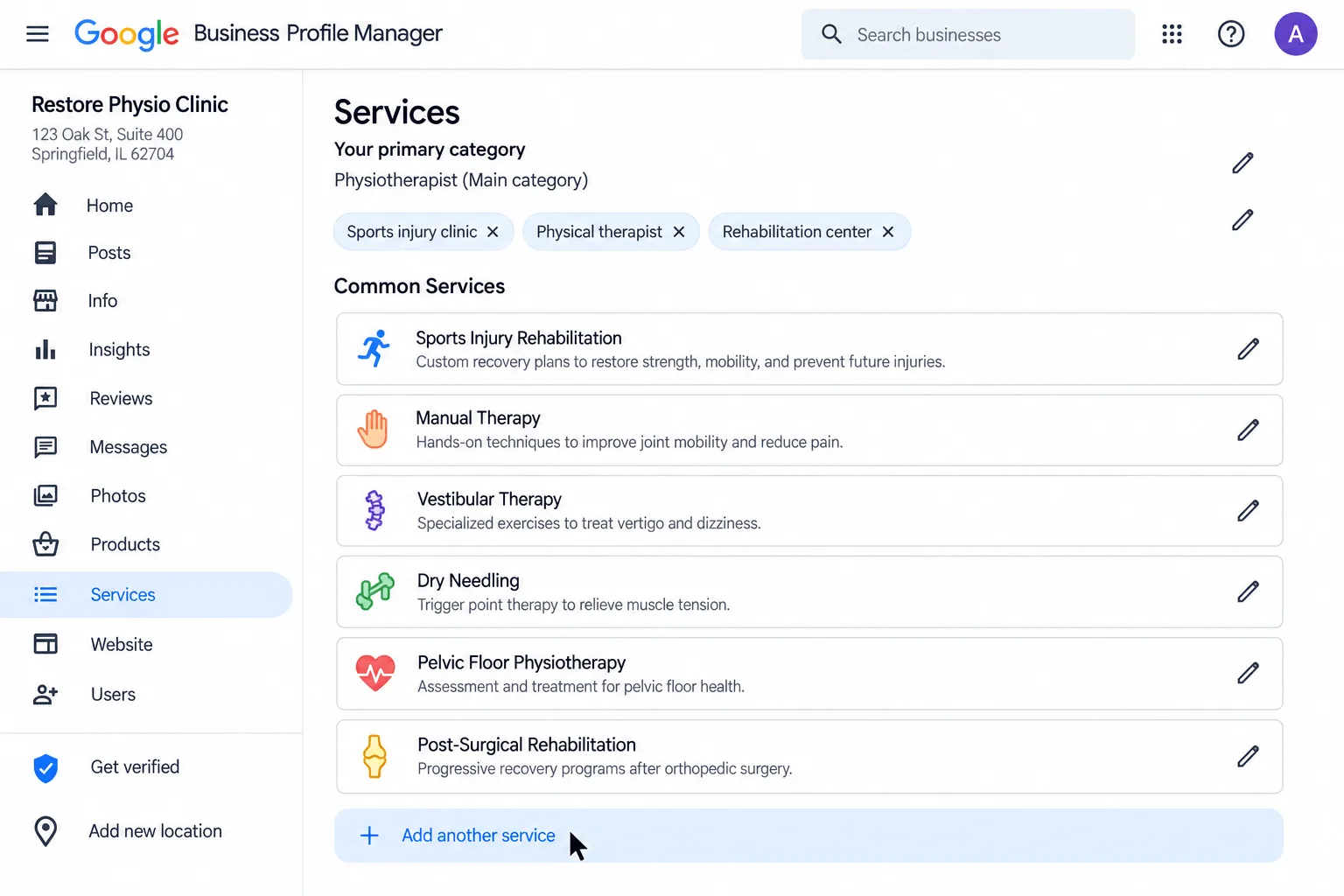
Each specific service creates a new entry point for search traffic. A patient typing “vestibular therapy near me” won’t find you if that phrase never appears on your profile. Be precise to ensure you show up for the right conditions.
-
Don’t Skip the Products Tab
Many clinics overlook the <Products> tab. Clinics selling braces, orthotics, resistance bands, or supplements should list them here. This section creates extra keyword space on the profile, catching search traffic that standard service lists miss.
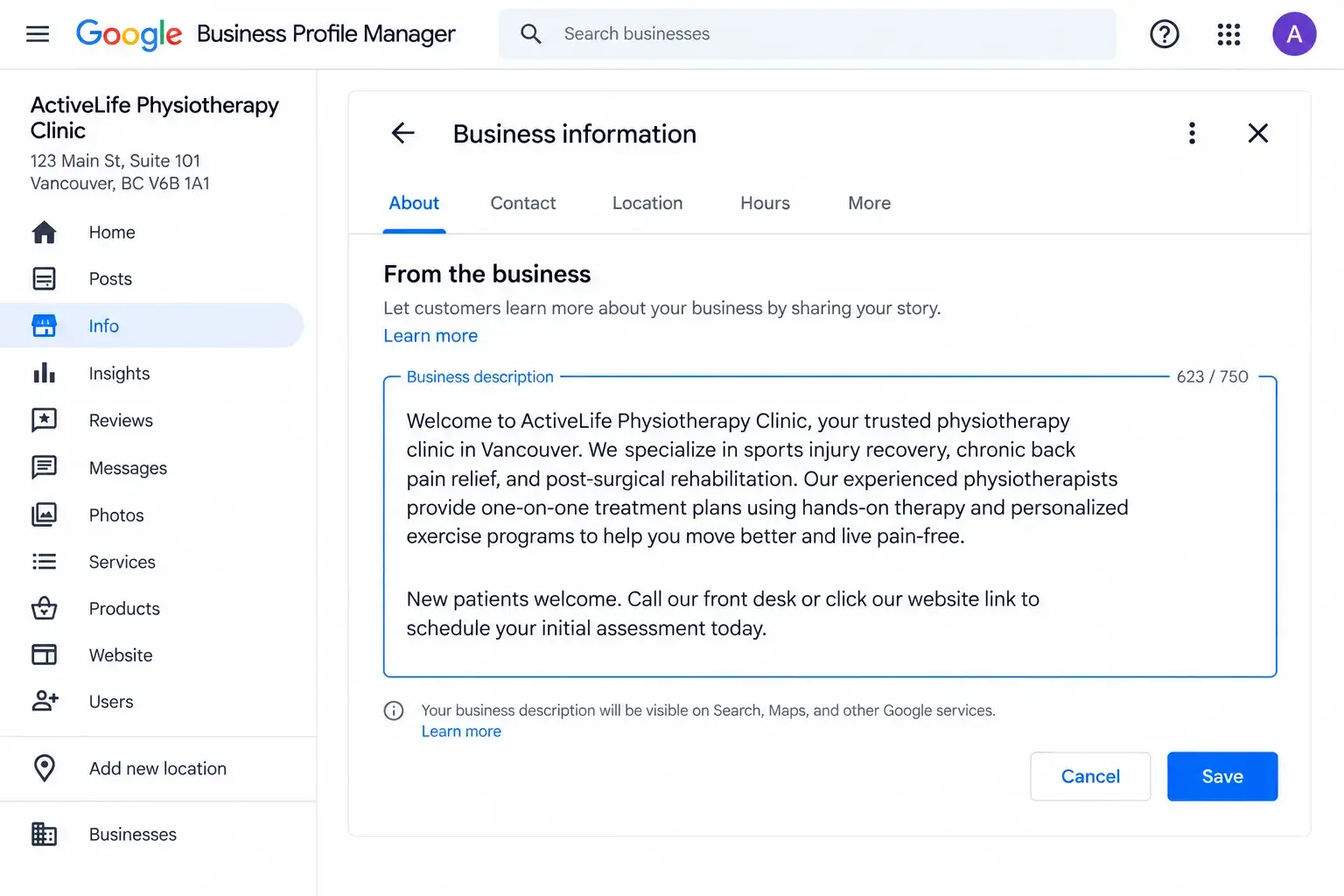
Step 3: Write a Compelling “From the Business” Description
GBP allows 750 characters for this description.
A simple formula works well: state the core service, name the target audience, explain what sets the practice apart, and close with a clear call to action.
Try something like: “We are a sports injury and rehabilitation clinic in [City] helping active adults recover from knee, shoulder, and back injuries without surgery. Our experienced physiotherapists offer one-on-one treatment plans tailored to your goals. Book your initial assessment today.”
Drop your primary keyword, something close to “physiotherapy in [City]” or “physiotherapy clinic,” into that first sentence. Naturally, though. Stuff it in and it reads like spam, and honestly, Google isn’t fooled by keyword stuffing anymore anyway. Write for the anxious patient reading it, not for a search algorithm.
See this example below:
Step 4: Add High-Quality Photos and Videos
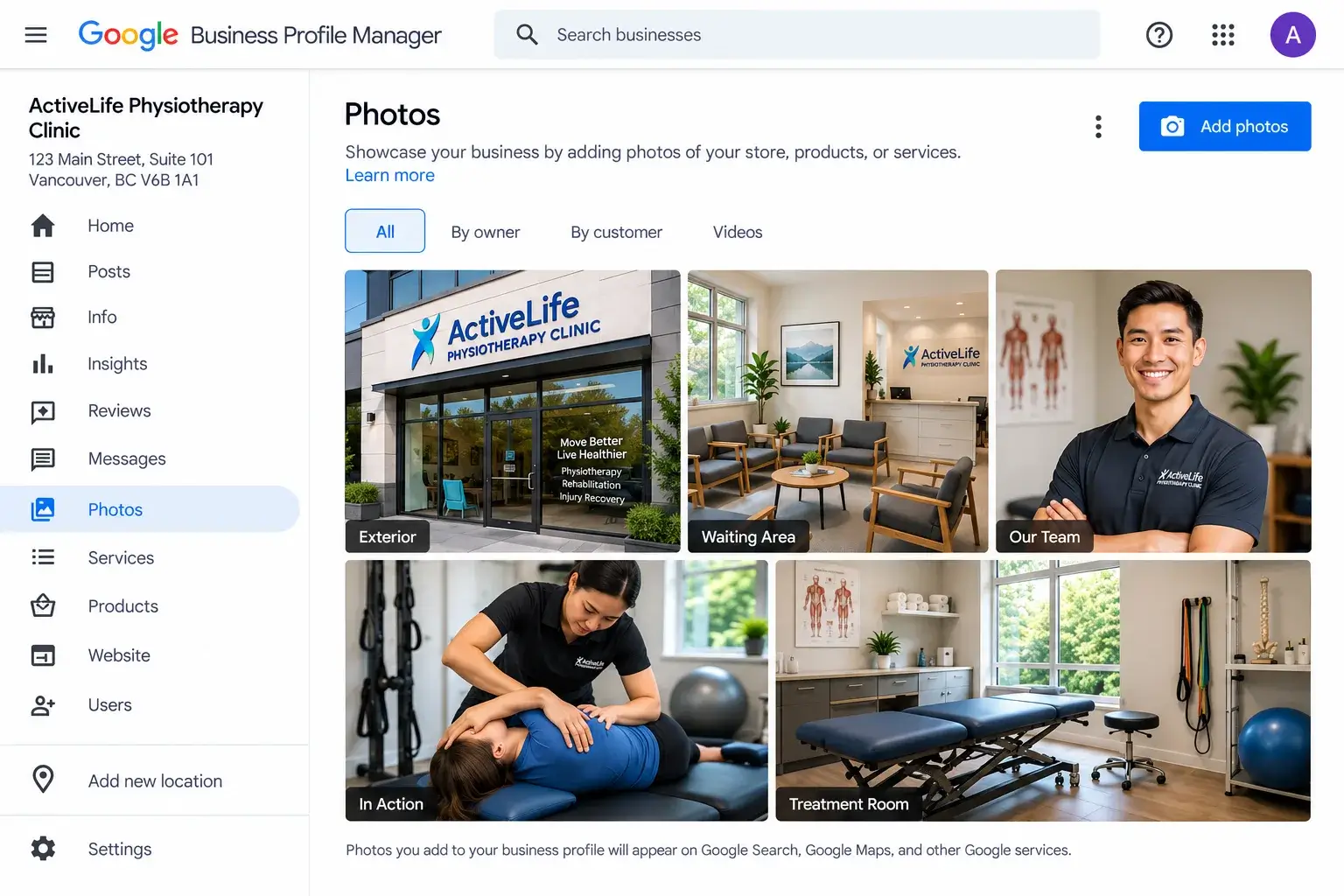
Healthcare is personal. People want to see where they’ll be treated before they book a single session. Visual content handles that crucial trust-building process for you.
When working on Google Business Profile optimization for physiotherapists, cover the basics:
- Exterior shots so people can actually find your door.
- Interior shots of treatment rooms and the waiting area.
- Real team photos, not stock images pulled off the internet. Patients notice immediately, and it undermines trust quickly.
- Action shots help too: a therapist working with a patient, as long as you have proper consent on file.
A quick word of caution here: any photo or video that shows a patient’s face or includes information that could identify them counts as protected health information under HIPAA if you’re operating in the U.S. Always get written consent before publishing anything that includes a real patient, and keep that signed consent on record, not just a verbal yes at the front desk. It’s a small extra step, but it protects both the patient and the clinic, and it means one careless upload doesn’t turn into a much bigger compliance problem down the line.
Video takes it further if you’re willing to put in the effort. A 30-second clinic walkthrough works well. So does a short clip of a physio explaining something common, like “What is Sciatica?” That’s genuinely useful content. It shows expertise without feeling like a sales pitch, and it gives patients a face to expect when they walk in.
| Pro Tip*: Most people browse profiles on their phones, not desktops. Keep photos sharp and well lit; skip anything dark or grainy. Geo-tagging your images before upload also gives a small extra boost, since it ties the image data back to your physical location. |
Step 5: Google Review Management for Physiotherapy Clinics
Review signals account for roughly 16% of local ranking weight, sitting right behind Google Business Profile signals and on-page SEO. With Google handling 81% of online review volume, patients read what others say to find a trusted physiotherapy clinic. Top-ranking businesses average 200+ reviews (4.0–5.0 stars), whereas the average local business has only 39. Reaching 50+ reviews with a 4.5+ average instantly puts you ahead of local competitors.
How to Actually Get More Reviews Without Feeling Awkward
Most clinics struggle with gathering feedback, but a simple system removes the guesswork:
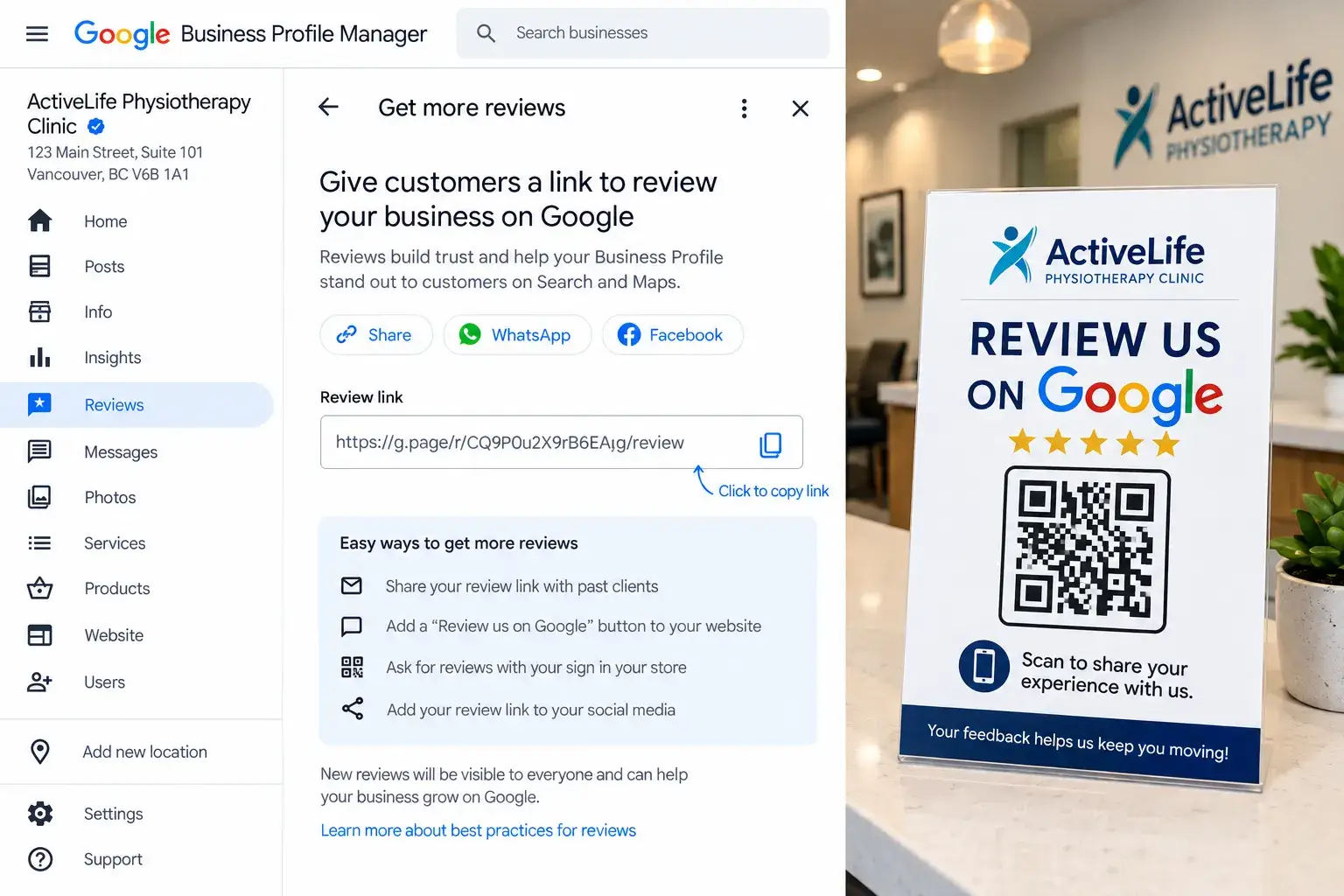
- Grab Your Direct Review Link: Go to your Google Business Profile dashboard, click “Get more reviews,” and copy the custom link to take patients straight to the form without friction.
- Ask When the Patient Feels the Win: Listen for milestone moments like “I can finally sleep through the night!” or ask at discharge when gratitude is high.
- Use a Low-Pressure Script: Train your front desk to ask for a few words about their experience with our sports injury rehabilitation team, keeping it warm and optional.
- Send the Link the Same Day: Follow up via SMS within a few hours while the positive experience remains fresh.
- Put a QR Code in the Waiting Room: Print a QR code sign at the front desk or in treatment rooms to capture easy scans.
- Respond to Every Single Review: Reply to positive, neutral, and negative reviews to show Google and prospective patients that you are active.
Two Things Most Clinics Never Learn About Reviews
First, Google weighs reviews that mention specific conditions like “lower back pain” or “post-surgery rehab” more than generic five-star ratings. Train your front desk team to gently encourage patients to mention their condition naturally in their review.
Second, consistency matters more than volume. Aim for two or three new reviews every week instead of asking twenty patients at once and then going quiet for months. A steady flow tells Google your clinic is active and trusted. That steady flow is what pushes you past competitors who only ask occasionally.
Sample Review Response Templates
Here are ready-to-use templates for responding to reviews:
| Positive Review:
“We’re so glad your knee feels stronger after the ACL rehab! Thank you for trusting us with your recovery. We’ll share your kind words with the team.” |
| Neutral Review:
“Thank you for taking the time to share your feedback. We’re always looking for ways to improve, and we appreciate you being part of our clinic community.” |
| Negative Review:
“We’re sorry to hear about your experience and appreciate you bringing this to our attention. Please contact our clinic manager directly at [phone] so we can learn more and make things right.” |
Step 6: Optimize the Q&A Section
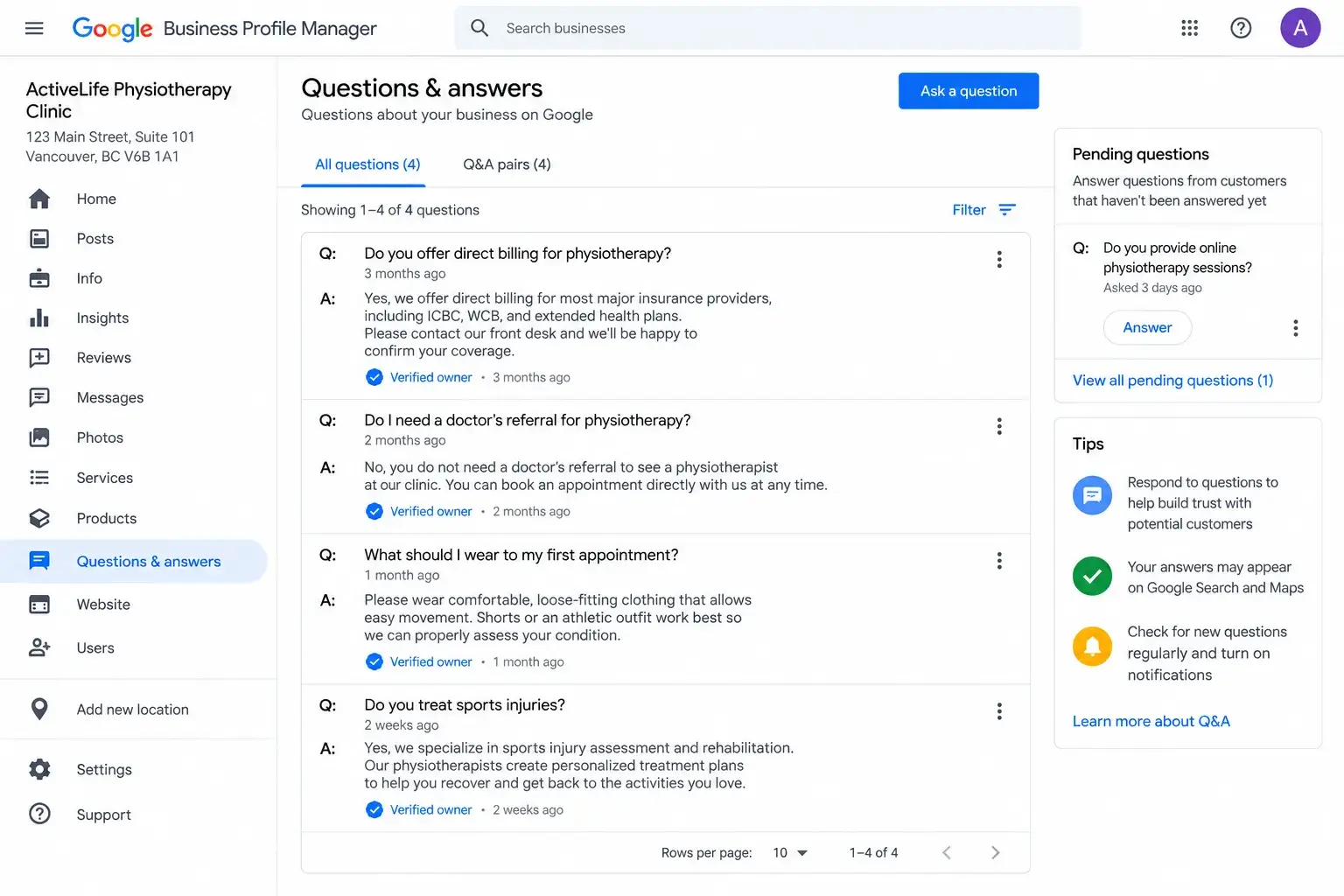
The Google Business Profile Questions and Answers section acts as an open public forum. Anyone on the internet can ask questions about a local practice. Worse still, no one answers them.
Ignoring this feature lets random strangers or local competitors post inaccurate details. These errors create confusion and damage professional credibility.
Taking control of this space forms a vital part of Google Business Profile optimization for physiotherapists. Drafting details independently establishes the narrative and builds trust. Patients choose a physical therapy clinic easily when clarity is guaranteed. Furthermore, Google indexes the text inside these entries. Optimized responses help sports injury rehabilitation services show up more often in local search results.
How to Build and Manage the Q&A Feed
Never wait for patients to ask questions. Pre-building a profile saves time and stops misinformation.
- Write Custom Questions: Type common inquiries and provide clear answers directly. Ask, “Do you treat motor vehicle accident injuries?” Then answer, “Yes, we specialize in MVA rehabilitation and offer direct billing for most insurance providers.”
- Pin Important Questions: Secure top billing inquiries at the top of the feed. Critical details become the first items prospective patients view.
- Monitor the Feed Weekly: Check the profile regularly. Fast responses keep information accurate.
Start Optimizing Your Google Business Profile Today
Step 7: Publish Regular Google Posts
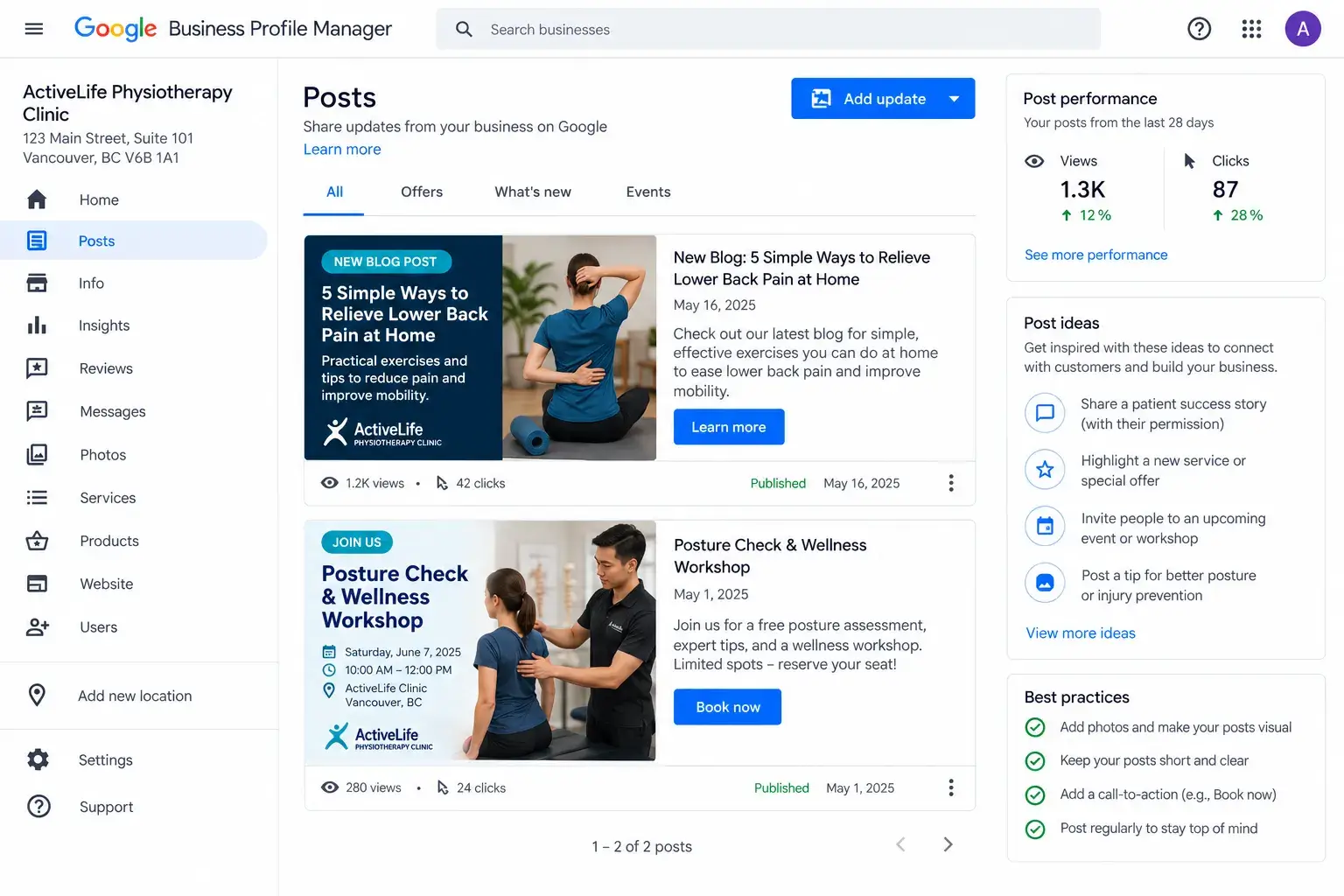
A Google Business Profile functions just like a mini social media feed. Many clinic owners complete their initial setup, walk away, and never touch the dashboard again. That represents a missed opportunity for Google Business Profile optimization for physiotherapists.
Google favors active listings over dormant ones. Publishing weekly updates signals to the algorithm and to prospective patients that your practice is successful, open, and engaged.
How to Use Google Posts Effectively
You do not need to invent complex marketing campaigns. Simple, helpful updates work best:
- Share Clinic Updates and Content: Publish brief summaries of new website articles, helpful recovery tips, or announcements about new staff members joining your sports injury rehabilitation team.
- Promote Special Offers: Highlight seasonal workshops, posture checks, or community events.
- Include a Clear Call to Action: Every post allows a button link. Direct users straight to the booking page or phone line so they can schedule an appointment instantly.
- Keep a Weekly Schedule: Aim for one or two posts every week. Consistency keeps your profile fresh and ensures visitors see recent activity whenever they search for a trusted physical therapy clinic.
Step 8: Track Performance with Insights
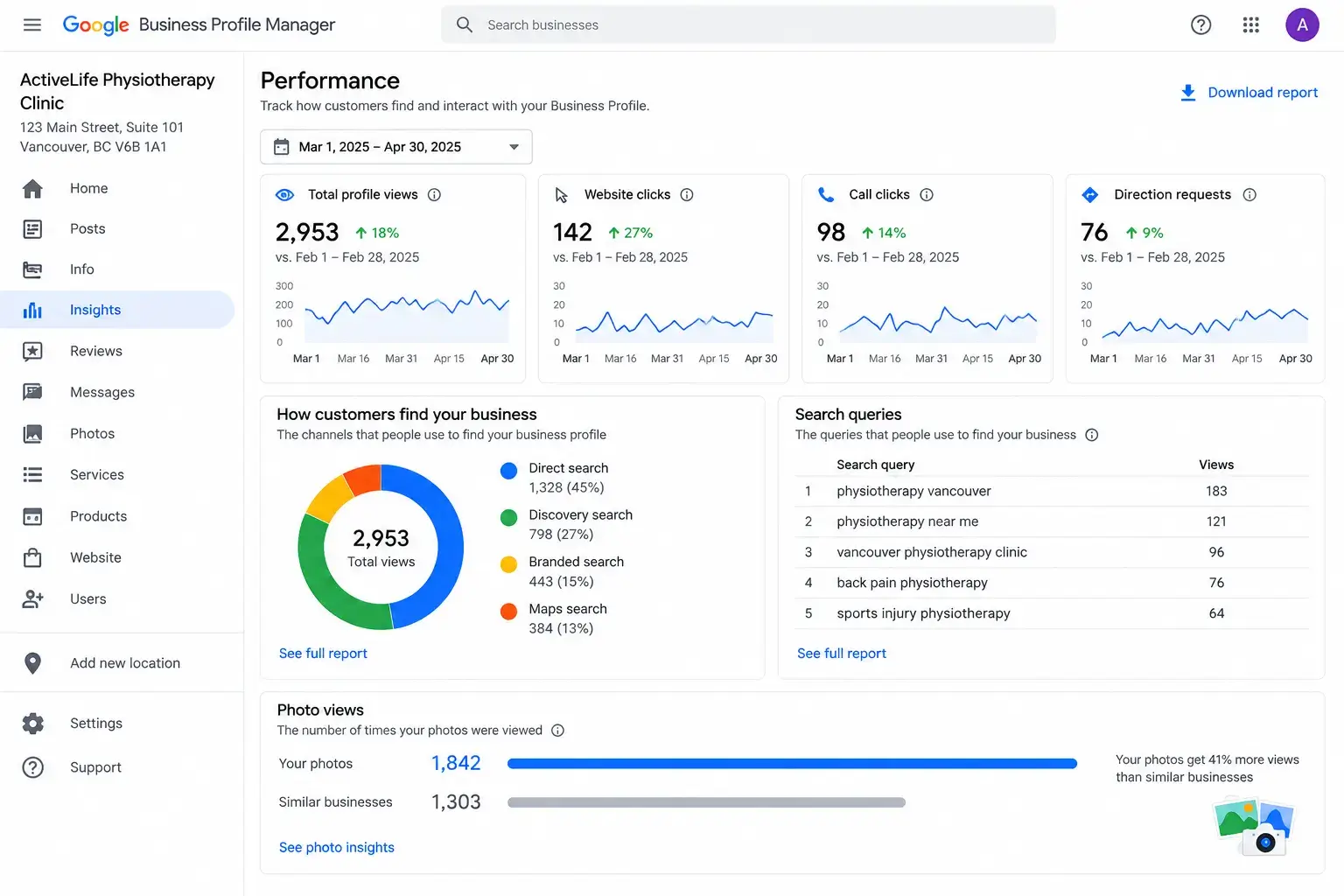
The Insights tab inside your dashboard reveals what works. Use this data rather than glancing at it once and forgetting it exists.
How to Access and Track Your Google Business Profile Insights
Navigating the performance dashboard requires a simple, repeatable routine:
- Log In and Locate Insights: Sign into the Google Business Profile manager dashboard and click on the Performance or Insights tab in the left-hand menu.
- Select Your Date Range: Choose a 30-day or 3-month view at the top of the page. Avoid checking daily numbers because short-term fluctuations hide true patterns.
- Analyze Search Queries: Review the exact terms people type to find your physiotherapy clinic. Queries like “physio for vertigo near me” attract different patients than broad terms. Knowing which words have higher search volume changes what you should publish next.
- Measure User Actions: Track how many people called your front desk, requested driving directions, or clicked through to the website.
- Compare Competitor Photo Views: Compare photo views against nearby competitors. Google shows this benchmark to indicate whether visual content attracts enough attention.
Turn Data Into Action
Review these metrics monthly to spot real trends and improve your Google Business Profile optimization for physiotherapists:
- Spot Winning Services: Notice if a specific treatment keeps popping up in search queries. Lean into that trend by writing more posts about it for your sports injury rehabilitation offerings.
- Update Visuals: Add more photos related to your top performing search terms to keep potential patients engaged.
- Expand Descriptions: Adjust your profile details to cover popular search topics in greater depth, making your physical therapy clinic stand out even further.
Google Business Profile Guidelines: Staying Eligible and Avoiding Suspension
None of the work covered in this guide matters if Google suspends your listing for a policy violation. It happens more often than clinic owners expect, usually from small, avoidable mistakes rather than anything intentional. Google requires a genuine physical presence, accurate real-world information, and content that doesn’t mislead patients, and staying inside those rules is what keeps your clinic showing up correctly on Search and Maps in the first place.
Eligibility basics
Your clinic needs to make in-person contact with patients at a real location. If you run a mobile or home-visit physiotherapy service, define your service area clearly rather than leaving it vague. A P.O. box or an unstaffed mailbox address doesn’t qualify, even if it’s technically where mail gets delivered.
Business name and details
List your clinic under its exact legal name, the same one on your signage and paperwork. Resist the urge to tack keywords onto the business name field, something like “ABC Physiotherapy Sports Injury Clinic,” since Google treats that as a guideline violation, not a ranking hack. Keep your hours, local phone number, and address accurate and current, and update them as soon as anything changes.
Content and reviews
Fake reviews, spam, or off-topic photos and posts all fall outside what Google allows, and getting flagged for any of them puts the whole profile at risk. Respond to reviews thoughtfully rather than ignoring them, and keep uploaded photos relevant to your clinic rather than generic stock imagery. When in doubt about a specific rule, Google’s own [Business Profile Help Center] is the most reliable place to check, since third-party summaries occasionally lag behind policy updates.
Treat this section as a quiet background check before you get too far into optimization. A clinic that’s fully optimized but sitting on shaky compliance ground can lose everything overnight, while one that starts with solid footing rarely runs into trouble later.
Common Mistakes to Avoid in Google Business Profile Optimization for Physiotherapists
To secure success in local search rankings, avoid hidden errors that quietly limit local visibility. Practitioners often make avoidable missteps that reduce patient bookings.
Reviewing these five critical traps prevents accidental Google Business Profile penalties and lost appointments:
- Keyword Stuffing in Business Names: Artificially cramming extra phrases into a title violates Google guidelines and triggers sudden account suspension. Legal names must remain exact.
- Unanswered Negative Reviews: Leaving customer complaints neglected signals poor patient care to both prospective visitors and search algorithms. Professional responses restore credibility immediately.
- Mismatched NAP Information: Use incorrect phone numbers, addresses, or business names across external web directories to confuse search engines and drop map rankings.
- Outdated Photo Galleries: Upload pictures once and fail to refresh the account, which leaves listings looking stagnant. Active image updates are essential for sports injury rehabilitation visibility.
- Incorrect Category Selection: Choosing the wrong classifications invites unqualified traffic. A physical therapy clinic must restrict primary and secondary categories strictly to medical care.
Your 7 Day Google Business Profile Action Plan
Feeling overwhelmed by all of this? Don’t be. Spread across a week, it’s genuinely manageable, even for a busy front desk.
| Day | Task |
| Day 1 | Claim and verify your profile. |
| Day 2 | Fix categories, add services, list products |
| Day 3 | Write your business description. |
| Day 4 | Upload 15+ photos and one video. |
| Day 5 | Publish your first Google Post. |
| Day 6 | Seed the Q&A section with 5 FAQs. |
| Day 7 | Ask 5 recent patients for reviews |
Stick to this plan, and by the end of week one, your clinic will have a profile that actually competes for the searches that matter, instead of quietly sitting there hoping patients stumble across it.
6 Strategies to Rank the Google Business Profile Higher
Now that you have set up properly and optimized the GBP, you might be wondering how to improve the ranking of Google Business Profile. Securing top positions on local search results requires advanced tactics that signal true authority to search engines. Dominating the local map pack brings a steady stream of patients directly to your door, making effective Google Business Profile optimization for physiotherapists essential for long-term growth.
1. Local Proximity Setup
Establish precise service area coverage and maintain exact location data so search algorithms match local patient intent accurately. Physical distance plays a massive role in map visibility, but strategic setup bridges small gaps effortlessly. Ensure your registered address maps precisely to your physical suite. Configure your service area settings properly if you travel to treat clients, preventing algorithm confusion and capturing hyper-local traffic for your physical therapy clinic.
2. Healthcare Directory Citations
List the practice consistently across trusted healthcare directories and local citation sites to reinforce digital footprint strength. Search engines crawl the entire web to cross-reference business details. When medical directories, local chamber listings, and citation platforms display matching information, algorithmic trust spikes. This verified consistency acts as a vote of confidence, proving your clinic operates as a legitimate medical provider through strong physiotherapy local SEO.
3. Geo-Tagged Media Uploads
Upload fresh, location-verified images of equipment and treatment rooms to prove physical presence and increase engagement signals. Modern smartphones embed geographical coordinate data directly into image files. Uploading these authentic assets tells Google your exact real-world location. Real photos of welcoming waiting areas, advanced treatment tables, and smiling staff members also drive higher click-through rates from prospective patients browsing the map during Google Maps optimization for physiotherapy clinic research.
4. Keyword-Rich Patient Reviews
Encourage patients to mention specific treatments, like sports injury rehabilitation, naturally in their feedback to strengthen relevance algorithms. Generic five-star ratings boost overall visibility, but reviews with specific medical terms carry more SEO weight. When happy visitors write about successful recovery from lower back pain, search crawlers index those keywords. This organic keyword association pushes your profile higher for niche searches.
5. Weekly Business Posts
Share regular posts about health tips and clinic announcements to prove ongoing activity and keep the profile fresh. Abandoned listings signal poor engagement to search engines. Weekly updates tell the algorithm your facility remains open and committed to patient care. Highlight upcoming workshops, share helpful posture guides, or introduce new practitioners joining your team. Each post adds another small signal that supports your clinic’s Google Maps ranking over time.
6. Long-Tail Search Targeting
Answer specific patient inquiries inside the Q&A section and service menus to capture specialized organic traffic. Broad search terms face fierce competition, but long-tail phrases capture users ready to book immediately. Build out detailed service menus covering niche offerings like vestibular therapy. Pre-populate your Q&A feed with answers to common insurance and injury questions, ensuring your profile covers every unique angle a patient types into a search bar.
Boost Your Physiotherapy Clinic’s Local Visibility Today
DIY vs. Professional Google Business Profile Optimization: What’s Right for Your Clinic?
Everything covered in this guide is genuinely doable independently. Nothing about claiming a profile, writing a description, or seeding a Q&A section requires technical skill missing from the staff. The real question is not whether the team can do this alone, but whether enough time exists to do it properly week after week on top of running an active physical therapy clinic.
That is where most physiotherapy practices run out of time.
The Case for DIY
A small, single-location clinic with spare hours and a front desk team willing to take on extra tasks can manage this internally. Local staff know patients, services, and the surrounding area better than anyone. The setup work described earlier, such as claiming the profile, selecting categories, writing the description, and uploading photos, can realistically be completed in a week using a structured action plan.
The difficulty comes after setup. Google Business Profile optimization for physiotherapists is not a one-time project. It requires ongoing effort: regular posts, steady review requests, monthly performance checks, and adapting as Google updates features. Most clinics start strong in week one and stop by month two once daily patient schedules fill up, or staff responsibilities shift.
The Case for Bringing in Professional Help
A dedicated agency handles this daily across multiple clinics, meaning the trial and error is already done. Physiotherapy SEO specialists know which categories move rankings, how to structure review requests that patients actually answer, and how to maintain profile activity without adding to the internal workload. For a multi-location clinic, or one serious about staying in the local 3-pack, that level of consistency is hard to sustain internally without a dedicated staff member.
This is where Marqade steps in. Rather than handing over a generic checklist, the team manages the ongoing aspects of physiotherapy local SEO that clinics find difficult to maintain: consistent Google posts, structured review collection systems, performance tracking, and the citation work that supports the listing. The goal is to handle the time-consuming parts of Google Maps optimization for physiotherapy clinic visibility so the clinical team stays focused on treating patients.
A Simple Way to Decide
Consider these three points:
- Does a team member have two to three hours weekly to dedicate to profile management consistently?
- Does the practice manage more than one location where maintaining uniform details across profiles takes extra effort?
- Is local competition already active with regular posts, photos, and patient reviews?
If the answer to those questions is yes, managing everything internally remains possible, though much harder to sustain over time. That is usually when facilities turn to Marqade to take the recurring workload off their hands while staying focused on patient care.
Conclusion
This isn’t a one-and-done job. It’s ongoing, a little upkeep, week after week, month after month. But the payoff is real. More visibility in the Map Pack. More trust from patients who were on the fence. More people are actually walking through your clinic’s door.
Audit your clinic’s profile today using everything covered above. Need a hand getting it right? Reach out for a free GBP audit, and we’ll walk through exactly where your profile is losing patients right now.
FAQs (Frequently Asked Questions)
Usually 24 to 48 hours. Some updates, especially category or name changes, can take up to a week to fully reflect in search results during routine Google Business Profile optimization for physiotherapists.
You can absolutely handle it yourself using the steps in this guide. Ongoing upkeep, meaning regular posts, review responses, and checking Insights, requires consistent time, though. That is usually the point where a physical therapy clinic hires a specialized agency to help with physiotherapy local SEO.
At least 15 to 20 to start. Profiles with more photos consistently get noticeably more clicks and calls than sparse ones, driving powerful Google Maps optimization for physiotherapy clinic performance.
One or two times a week works well. It is enough to stay active without it turning into a burden for your internal team while supporting your physiotherapy clinic Google Maps ranking strategy.
Your website is the brochure. Your Google Business Profile is the salesperson, showing up directly inside local search and the Map Pack, while your website relies on separate organic search work to rank.
Yes, in a meaningful way. Google factors review response rate into prominence, and patients reading your profile notice it too. A clinic that answers every review looks far more trustworthy.
Not fundamentally, but the details differ. Healthcare searches carry more urgency and trust requirements than standard retail searches, making precise Google Business Profile optimization for physiotherapists essential for capturing high-intent patients.
Fixing NAP consistency and building a steady flow of patient feedback. Both are free, both take little time to start, and both move the needle faster than almost anything else.
No. Individual practitioner profiles almost always create confusion, split your reviews across multiple listings, and dilute the prominence signal Google uses to rank you. Keep one strong, well-maintained profile for the clinic itself.
Get Your Free SEO Plan